Container Loading Calculator: How It Works and What to Enter
How a container loading calculator works, which inputs it needs (inside size, door, payload, rotation, stacking) and why volume-only answers overstate fit.
Sea containers · · 8 min read
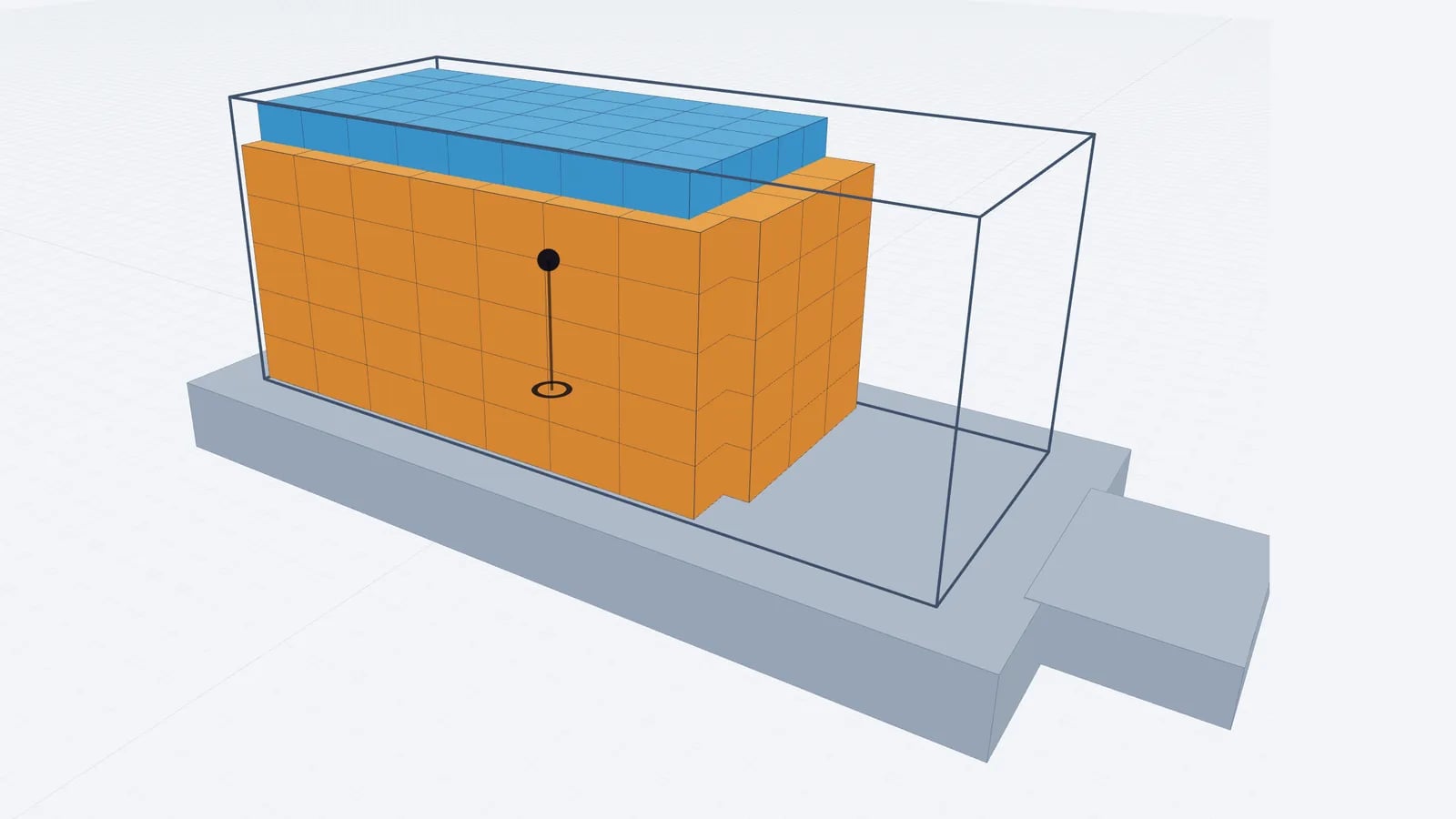
A container loading calculator works out how many pieces fit in a 20ft, 40ft or 40ft High Cube container by fitting their real dimensions into the box's inside length, width and height, then capping the count at the payload. A good one also respects the door opening, which way up each piece may stand and how high it may be stacked. A calculator that only divides volumes will almost always promise more than the container can take.
This guide explains what goes on inside such a calculator, which inputs matter, how to read the answer, and where the simple tools stop being enough. The numbers below use typical ISO inside sizes; check the actual box your line supplies, because builders and container series differ by a few centimetres.
What a container loading calculator actually does
Every serious calculator follows the same logic. It does not ask "how many cubic metres do I have?" but "how many whole pieces can I lay along the length, across the width and up the height?" The difference is that a container is made of fixed walls and pieces cannot be cut to fill the last 30 cm.
- 1Read the space. Inside length, width and height, the door opening and the maximum payload.
- 2Read the piece. Length, width, height and weight, plus whether it may be turned and how many may stand on top of each other.
- 3Try each allowed orientation. For a carton that must stay upright that means two floor orientations; for one that may lie on any side, up to six.
- 4Build the floor pattern. Count pieces along the length and across the width, and test mixed patterns, where part of the floor is filled lengthwise and the rest crosswise.
- 5Count the layers. Inside height divided by piece height, rounded down, then limited by the stacking rule.
- 6Apply the payload. If the count times the piece weight is over the payload, the weight sets the answer instead of the space.
Our free cartons in a container calculator runs exactly these steps for one carton size, and splits the floor into two blocks when that fits more.
The inputs that change the answer
Input: Inside length
- Typical value
- 20ft about 590 cm, 40ft and 40ft HC about 1,203 cm
- What happens if you get it wrong
- One row more or less over the whole container
Input: Inside width
- Typical value
- About 235 cm
- What happens if you get it wrong
- Decides whether pieces fit 2, 3 or 5 across; a few cm make the difference
Input: Inside height
- Typical value
- About 239 cm, or about 269 cm in a High Cube
- What happens if you get it wrong
- Decides the number of layers
Input: Door opening
- Typical value
- About 234 cm wide; about 228 cm high on a standard box, about 258 cm on a High Cube
- What happens if you get it wrong
- Tall pieces or pre-built stacks may fit inside but not through the door
Input: Payload
- Typical value
- 20ft about 28,200 kg, 40ft about 26,680 kg, 40ft HC about 26,460 kg
- What happens if you get it wrong
- Dense goods run out of weight long before space
Input: Rotation
- Typical value
- This side up, or free
- What happens if you get it wrong
- Free rotation can add a layer or a column; forbidding it protects the goods
Input: Stacking
- Typical value
- Number of tiers or kg on top
- What happens if you get it wrong
- A carton that crushes under four layers cannot be loaded five high
| Input | Typical value | What happens if you get it wrong |
|---|---|---|
| Inside length | 20ft about 590 cm, 40ft and 40ft HC about 1,203 cm | One row more or less over the whole container |
| Inside width | About 235 cm | Decides whether pieces fit 2, 3 or 5 across; a few cm make the difference |
| Inside height | About 239 cm, or about 269 cm in a High Cube | Decides the number of layers |
| Door opening | About 234 cm wide; about 228 cm high on a standard box, about 258 cm on a High Cube | Tall pieces or pre-built stacks may fit inside but not through the door |
| Payload | 20ft about 28,200 kg, 40ft about 26,680 kg, 40ft HC about 26,460 kg | Dense goods run out of weight long before space |
| Rotation | This side up, or free | Free rotation can add a layer or a column; forbidding it protects the goods |
| Stacking | Number of tiers or kg on top | A carton that crushes under four layers cannot be loaded five high |
The full table of sizes for every box type is in shipping container dimensions. Two inputs are often missed. The door is lower than the ceiling because of the door header, so a pallet that clears the roof inside may still hit the frame on the way in. The payload is printed on the CSC plate on the door and differs by container; the values above are typical, not guaranteed. Road weight limits on the trucking leg at either end may be lower than the container's own payload, so check them for your route.
Why volume-only calculators overstate fit
A volume calculator divides the container's cubic metres by the piece's cubic metres. That answer assumes the cargo behaves like liquid. Take cartons of 60 × 40 × 40 cm, 0.096 m³ each, in a 20ft container of 590 × 235 × 239 cm (33.1 m³).
Method: Volume only
- Cartons
- 345
- How it is worked out
- 33.1 m³ ÷ 0.096 m³
Method: Volume with 85 % usable rule
- Cartons
- 293
- How it is worked out
- 28.2 m³ ÷ 0.096 m³
Method: Real geometry, this side up
- Cartons
- 240
- How it is worked out
- 48 on the floor × 5 layers
Method: Real geometry, max 3 high
- Cartons
- 144
- How it is worked out
- 48 on the floor × 3 layers
Method: Payload cap at 125 kg per carton
- Cartons
- 225
- How it is worked out
- 28,200 kg ÷ 125 kg
| Method | Cartons | How it is worked out |
|---|---|---|
| Volume only | 345 | 33.1 m³ ÷ 0.096 m³ |
| Volume with 85 % usable rule | 293 | 28.2 m³ ÷ 0.096 m³ |
| Real geometry, this side up | 240 | 48 on the floor × 5 layers |
| Real geometry, max 3 high | 144 | 48 on the floor × 3 layers |
| Payload cap at 125 kg per carton | 225 | 28,200 kg ÷ 125 kg |
The geometry is what really happens. Along the 590 cm length, nine cartons of 60 cm use 540 cm. Across 235 cm, five cartons of 40 cm use 200 cm. That is 45 per layer. The 50 cm left at the end takes one column turned crosswise, three cartons of 60 cm across, so the floor holds 48. Five layers of 40 cm use 200 of the 239 cm, and the last 39 cm stays empty because a sixth layer does not fit. The result is 240 cartons and about 70 % of the volume.
So the volume method promised 105 cartons that do not exist, and even the common 85 % rule of thumb overstated by more than 50. The gap is largest for big pieces and pallets, because each wasted strip at a wall is wider. That is why fill rates should be read alongside the count, as covered in container utilization.
Good to know
The 85 % rule is still useful for one thing: choosing the container size before you know the exact pieces. The container size calculator uses it to tell you whether a volume and weight need a 20ft, a 40ft or a High Cube.
How to read the result
A container loading calculator usually gives you four numbers. Each answers a different question.
- Count. How many pieces fit. Treat it as the ceiling for a well-executed load, not a target the crew will always reach.
- Layers and floor pattern. How many per layer and how many layers. If the pattern is mixed, the crew needs to know which part is turned, or they will load every row the same way and lose pieces.
- Fill rate. Used volume as a share of the inside volume. A low fill rate with a full count tells you the piece size does not divide well into the box; a different carton or a High Cube may help.
- Limiting factor. Whether the space or the payload stopped the load. If it is weight, a bigger container will not take more; a 20ft may even be the cheaper choice. See 20ft vs 40ft.
Then look at what is left over. A 39 cm gap under the roof, a 35 cm strip along a side wall or a half-metre at the doors is space the cargo can move into. Those voids need dunnage or airbags, and they need to be planned before the container arrives.
Worked example: choosing between two carton sizes
A supplier can pack the same product in a 60 × 40 × 40 cm carton or in a slightly larger 58 × 39 × 46 cm carton. Which loads better in a 20ft, this side up?
- 60 × 40 × 40: 48 per layer, 5 layers, 240 cartons.
- 58 × 39 × 46: along the length 590 ÷ 58 = 10 (580 cm), across 235 ÷ 39 = 6 (234 cm), so 60 per layer. Height 239 ÷ 46 = 5 layers (230 cm). 300 cartons.
The second carton is 0.104 m³, so 300 of them are 31.2 m³, about 94 % of the inside volume. It also leaves only 1 cm across the width, which in practice is too tight for hand loading; carton bulge and the corrugated side walls of the container eat more than that. A planner would test 38 cm instead of 39 cm before committing. This is the kind of question a calculator answers in seconds and a spreadsheet does not.
Tip
Ask the calculator for the count with your real tolerances. Adding 1 cm to each carton dimension for bulge often costs a whole column, and it is better to find that out at the desk than at the container door.
Where a single-item calculator stops
A container loading calculator for one item size is the right tool for a homogeneous load. It cannot tell you what happens when cartons, pallets and crates share a box, when some pieces may not carry weight, or when the goods for two consignees must come out in order. It also cannot place pieces on top of others that only cover part of their footprint, or check where the centre of gravity ends up.
For those loads you need a planner that places every piece. How that works with a mixed shipment, with a worked 40ft example, is in container load calculator for mixed cargo. For floor-loaded cartons and their crush strength, see our guide to loading cartons in a container.
In EveryLoading you can paste the packing list from Excel into the cargo table, pick a 20ft, 40ft or 40ft HC preset, set which items may be rotated or stacked, and let the optimizer place everything in 3D. Every result in the free calculators also opens in the 3D planner with one click, and you can start with a free account. The sea freight use case shows the full workflow.
Frequently asked questions
How do I calculate how many boxes fit in a container?
Divide the inside length, width and height by the box dimensions, round each down, and multiply. Try the box turned on the floor too, and cap the total at the container's payload divided by the box weight.
Is CBM enough to know if my cargo fits a container?
No. CBM tells you whether the volume could fit in theory, but walls, layers and pallet footprints waste space. Plan with about 85 % of the inside volume at most, and check the real piece count before booking.
What is the usable volume of a 20ft and 40ft container?
Inside, a 20ft has about 33 m³ and a 40ft about 67 m³. In practice around 25–28 m³ and 55–58 m³ can be filled, depending on how well the pieces divide into the box.
Why does the calculator say my cargo is weight-limited?
The pieces are dense enough that the payload is reached before the space is full. A larger container will not help; check whether a 20ft carries the same weight for less.
Keep reading
Sea containers · · 5 min read
Container Utilization: How to Measure and Improve Fill
Measure container utilization by volume, weight and floor area, see why 100% is unrealistic, and use rotation, mixed lanes and box choice to load more.
Read article
Sea containers · · 7 min read
Container Loading Report: What to Record for Every Box
What a container loading report should hold: tally sheet, photos per stage, seal number, VGM and the load plan, and the evidence that decides cargo claims.
Read article
Sea containers · · 7 min read
Container Load Calculator for Mixed Cargo: A 40ft Example
Why a container load calculator for mixed cargo must place every piece: pallets, crates and cartons in one 40ft, worked through with real numbers.
Read article