Container Load Calculator for Mixed Cargo: A 40ft Example
Why a container load calculator for mixed cargo must place every piece: pallets, crates and cartons in one 40ft, worked through with real numbers.
Sea containers · · 7 min read
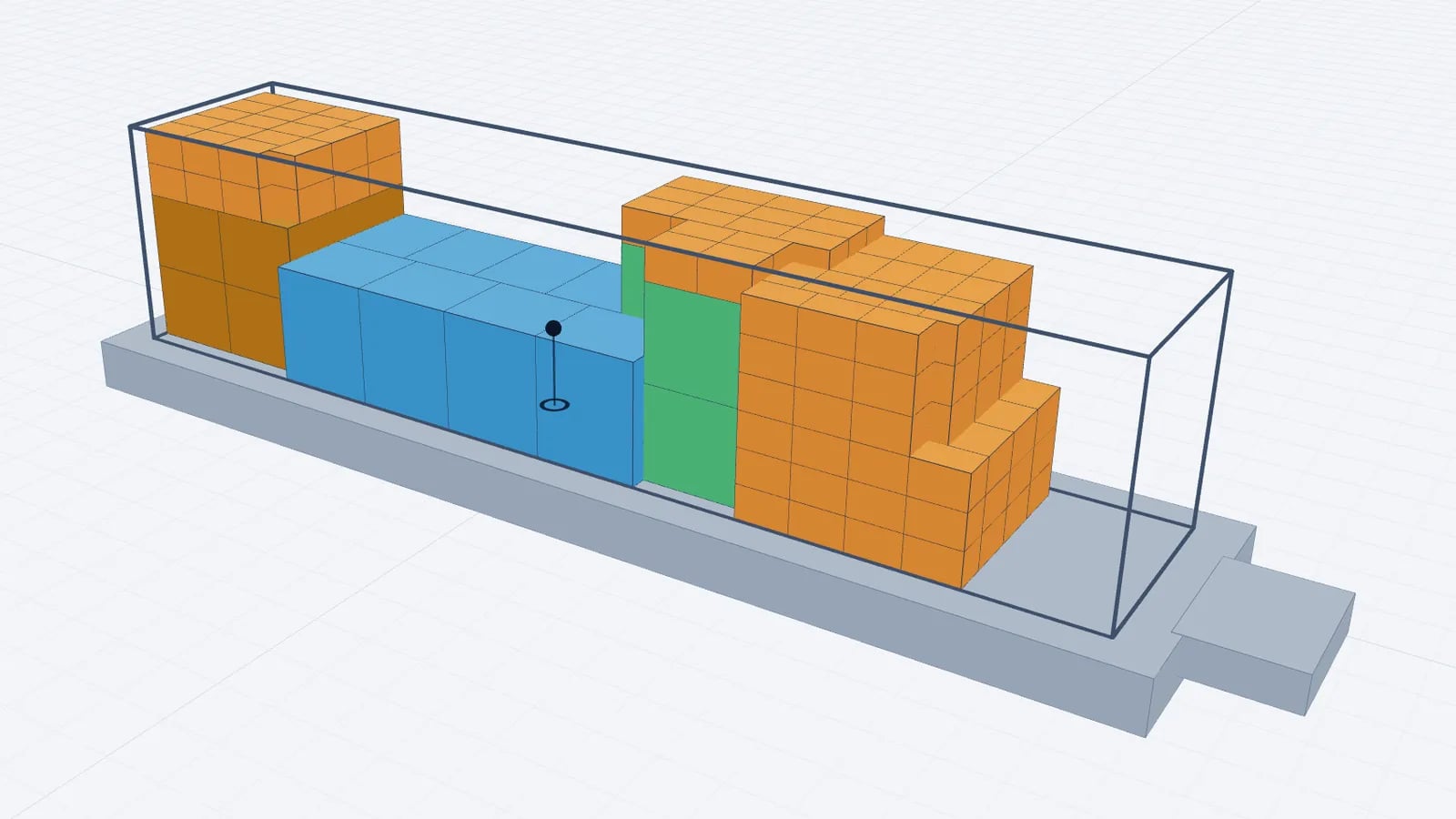
A container load calculator for mixed cargo has to place every piece in the box, because pallets, crates and cartons of different sizes interact: one item's footprint decides what fits beside it, and its stacking rules decide what can go on top. Adding up the volumes or running a separate calculator for each item type will tell you the load fits when it does not. The 40ft example below shows by how much.
Single-size calculators are the right tool for a homogeneous load, and how a container loading calculator works explains their logic. This article is about the other case: a shipment with three or four kinds of packaging going to one consignee in one container.
Why per-item calculators fail on mixed loads
Run a pallet calculator and it says 20 industrial pallets fit a 40ft. Run a carton calculator and it says 500 cartons of 60 × 40 × 40 cm fit. Both are right on their own. Neither tells you what happens when 8 pallets, 4 crates, 8 Euro pallets and a few hundred cartons share the same 12 metres. Four things break the simple sums:
- Footprints do not tile. Two industrial pallets side by side take 200 cm of the 235 cm width; two Euro pallets lengthwise take 160 cm. The strips left over are a different width in each section and only some cargo fits them.
- Heights do not match. A 140 cm pallet next to a 220 cm stack leaves a stepped roof line. Space above the low item is only usable if that item can carry weight.
- Stacking rules are per item. A pallet that must not be top-loaded wastes everything above it, however much volume the calculator counts.
- Weight sits somewhere. The total can be well under the payload while most of it is at one end of the box. Per-item tools never see the centre of gravity.
The shipment
A machinery supplier ships one 40ft dry container (inside about 1,203 × 235 × 239 cm, payload about 26,680 kg, 67.6 m³) to one customer. The packing list:
Item: Machine-part crates
- Qty
- 4
- Size (cm)
- 200 × 110 × 90
- Weight each
- 380 kg
- Rules
- Stack 2 high, one light layer on top
- Volume
- 7.92 m³
Item: Industrial pallets
- Qty
- 8
- Size (cm)
- 120 × 100 × 140
- Weight each
- 700 kg
- Rules
- Nothing on top
- Volume
- 13.44 m³
Item: Euro pallets
- Qty
- 8
- Size (cm)
- 120 × 80 × 110
- Weight each
- 400 kg
- Rules
- Stack 2 high
- Volume
- 8.45 m³
Item: Cartons
- Qty
- 160
- Size (cm)
- 60 × 40 × 40
- Weight each
- 10 kg
- Rules
- This side up, 5 high
- Volume
- 15.36 m³
Item: Total
- Qty
- Size (cm)
- Weight each
- 11,920 kg
- Rules
- Volume
- 45.2 m³
| Item | Qty | Size (cm) | Weight each | Rules | Volume |
|---|---|---|---|---|---|
| Machine-part crates | 4 | 200 × 110 × 90 | 380 kg | Stack 2 high, one light layer on top | 7.92 m³ |
| Industrial pallets | 8 | 120 × 100 × 140 | 700 kg | Nothing on top | 13.44 m³ |
| Euro pallets | 8 | 120 × 80 × 110 | 400 kg | Stack 2 high | 8.45 m³ |
| Cartons | 160 | 60 × 40 × 40 | 10 kg | This side up, 5 high | 15.36 m³ |
| Total | 11,920 kg | 45.2 m³ |
A volume calculator sees 45.2 m³ against 67.6 m³, or 57.4 m³ usable at the usual 85 % rule. It reports a 67 % fill and room for about 12 m³ more, roughly 127 extra cartons. The weight is 45 % of the payload. On paper the container is comfortable.
Placing it piece by piece
Now build the load from the front wall to the doors, the way a container load calculator for mixed cargo does it:
Section: 1
- From front wall
- 0–200 cm
- What goes there
- 4 crates, 2 across (220 cm) and 2 high (180 cm); 15 cartons as one layer on top
- Left over
- 15 cm strip at the side wall, 19 cm under the roof
Section: 2
- From front wall
- 200–680 cm
- What goes there
- 8 industrial pallets in 4 rows of 2 (200 cm across)
- Left over
- 35 cm strip along 4.8 m, 99 cm above every pallet
Section: 3
- From front wall
- 680–920 cm
- What goes there
- 8 Euro pallets, 2 lengthwise across (160 cm) in 2 rows, 2 high (220 cm); 30 cartons in the 75 cm strip beside them, 6 per layer × 5 layers
- Left over
- 19 cm under the roof
Section: 4
- From front wall
- 920–1,203 cm
- What goes there
- 115 cartons: per layer 4 × 5 lengthwise plus 3 turned crosswise, 5 layers
- Left over
- 39 cm under the roof, 3 cm at the doors
| Section | From front wall | What goes there | Left over |
|---|---|---|---|
| 1 | 0–200 cm | 4 crates, 2 across (220 cm) and 2 high (180 cm); 15 cartons as one layer on top | 15 cm strip at the side wall, 19 cm under the roof |
| 2 | 200–680 cm | 8 industrial pallets in 4 rows of 2 (200 cm across) | 35 cm strip along 4.8 m, 99 cm above every pallet |
| 3 | 680–920 cm | 8 Euro pallets, 2 lengthwise across (160 cm) in 2 rows, 2 high (220 cm); 30 cartons in the 75 cm strip beside them, 6 per layer × 5 layers | 19 cm under the roof |
| 4 | 920–1,203 cm | 115 cartons: per layer 4 × 5 lengthwise plus 3 turned crosswise, 5 layers | 39 cm under the roof, 3 cm at the doors |
The four sections take the full 1,203 cm. All 160 cartons are placed, but there is nowhere for the 127 extra cartons the volume method promised. The "spare" 12 m³ is real, but it is spread over strips 15 to 39 cm wide and the 99 cm above pallets that must not carry anything. None of it holds a 60 × 40 × 40 carton.
Good to know
The stacking rule on the industrial pallets alone costs 80 cartons. If they could take a light top load, two carton layers would fit in the 99 cm above them: 8 along × 5 across × 2 layers over the 480 × 200 cm area. Check the real rule with the supplier before you accept or reject that space.
Checking the weight along the length
The load weighs 11,920 kg, far below the payload, so a total check passes. The distribution needs its own check. Take each section's weight and the middle of the section:
Section: 1 crates + top cartons
- Weight
- 1,670 kg
- Centre from front wall
- 100 cm
- Weight × centre
- 167,000
Section: 2 industrial pallets
- Weight
- 5,600 kg
- Centre from front wall
- 440 cm
- Weight × centre
- 2,464,000
Section: 3 Euro pallets + cartons
- Weight
- 3,500 kg
- Centre from front wall
- 800 cm
- Weight × centre
- 2,800,000
Section: 4 carton wall
- Weight
- 1,150 kg
- Centre from front wall
- 1,061.5 cm
- Weight × centre
- 1,220,725
Section: Total
- Weight
- 11,920 kg
- Centre from front wall
- 558 cm
- Weight × centre
- 6,651,725
| Section | Weight | Centre from front wall | Weight × centre |
|---|---|---|---|
| 1 crates + top cartons | 1,670 kg | 100 cm | 167,000 |
| 2 industrial pallets | 5,600 kg | 440 cm | 2,464,000 |
| 3 Euro pallets + cartons | 3,500 kg | 800 cm | 2,800,000 |
| 4 carton wall | 1,150 kg | 1,061.5 cm | 1,220,725 |
| Total | 11,920 kg | 558 cm | 6,651,725 |
The centre of gravity is at 6,651,725 ÷ 11,920 = 558 cm, about 43 cm forward of the container's middle at 601.5 cm. The front half carries about 53 % of the cargo weight, inside the rule of thumb of no more than about 60 % in either half. Had the planner put the heavy industrial pallets at the doors and the light cartons at the front, the same load would sit well behind the middle. The method is explained in centre of gravity of a load.
What the voids mean for securing
The piece-by-piece plan also shows where the cargo can move. The 35 cm strip beside the industrial pallets runs for 4.8 m; in a sea container that is a gap the pallets will slide into on the first roll. The same applies to the 15 cm strip beside the crates. Both need filling before the box leaves: timber blocking, dunnage bags or empty pallets on edge. The methods are covered in container dunnage and securing.
A volume calculator cannot warn you about any of this, because it never decides where anything goes. That is the main practical reason to plan a mixed container in 3D: the voids are visible, so the dunnage can be ordered with the booking rather than improvised at the dock.
How to plan a mixed container
- 1Collect real data. Measured dimensions and weights of each item type, including pallet overhang and carton bulge.
- 2Record the rules. Which items may be stacked, how many high, which may not carry anything, which must stay upright or on the floor.
- 3Choose the box. Use the container size calculator to see whether volume or weight is the limit, then pick the container.
- 4Place the big, rigid items first. Crates and heavy pallets decide the floor plan; cartons fill around them.
- 5Fill strips with what fits. A 75 cm strip takes cartons; a 35 cm strip probably takes only dunnage.
- 6Check the centre of gravity and the stacking. Recalculate after every change of order.
- 7Give the crew the sequence. A drawing per section, in loading order, so the mixed pattern is built the way it was planned.
Tip
If the pallets are close in size, it often pays to keep each size in its own section of the container, as above, rather than alternating rows. Mixed rows of 100 cm and 80 cm wide pallets leave a different gap in every row, which is hard to block. See how many pallets fit in a container for the patterns per size.
Using a planner for mixed cargo
In EveryLoading you paste the packing list from Excel into the cargo table, one row per item type, and set the rules per row: not stackable, the maximum number of loads on top, the maximum weight on top, floor only, or which other items it may stand on. The optimizer places everything in the container, respects those rules for every column, and reports anything that did not fit. You can then drag items in 3D, check the centre-of-gravity estimate and step through the loading order. The settings are explained in the cargo settings manual, and you can start with a free account in the planner.
Mixed cargo is also where the order of the container matters most when there is more than one consignee. That is covered in container loading sequence.
Frequently asked questions
Can I put pallets and cartons in the same container?
Yes, and it is common. Place the pallets first to set the floor plan, then use cartons to fill the strips beside them and the space above pallets that can carry a top load.
How do I calculate CBM for mixed cargo?
Multiply length × width × height in metres for each item type, multiply by the quantity and add the totals. Use that to choose a container size, then check the real fit by placing the pieces, because the total CBM ignores gaps.
What fill rate is realistic for a mixed container?
Often 60–75 % of the inside volume, less with tall non-stackable pallets. Homogeneous carton loads reach higher fill rates than mixed pallet loads.
How should weight be spread in a mixed container load?
Put the heaviest items on the floor and spread them along the length so the centre of gravity stays near the middle. A common rule of thumb is no more than about 60 % of the cargo weight in either half.
Keep reading
Sea containers · · 7 min read
Container Loading Report: What to Record for Every Box
What a container loading report should hold: tally sheet, photos per stage, seal number, VGM and the load plan, and the evidence that decides cargo claims.
Read article
Sea containers · · 8 min read
Container Loading Calculator: How It Works and What to Enter
How a container loading calculator works, which inputs it needs (inside size, door, payload, rotation, stacking) and why volume-only answers overstate fit.
Read article
Sea containers · · 10 min read
Shipping Crate Design: Sizing Crates to Fit the Container
How to design a shipping crate: size it to the container door and inside, skids, ISPM 15, weight and CoG marks, stacking, with a worked 40' HC example.
Read article