Load Planning in Excel vs a 3D Planner: When to Switch
Where load planning in Excel works, where it breaks (stacking, mixed sizes, axles, sequence) and how to keep your spreadsheet as input for a 3D planner.
Operations & software · · 5 min read
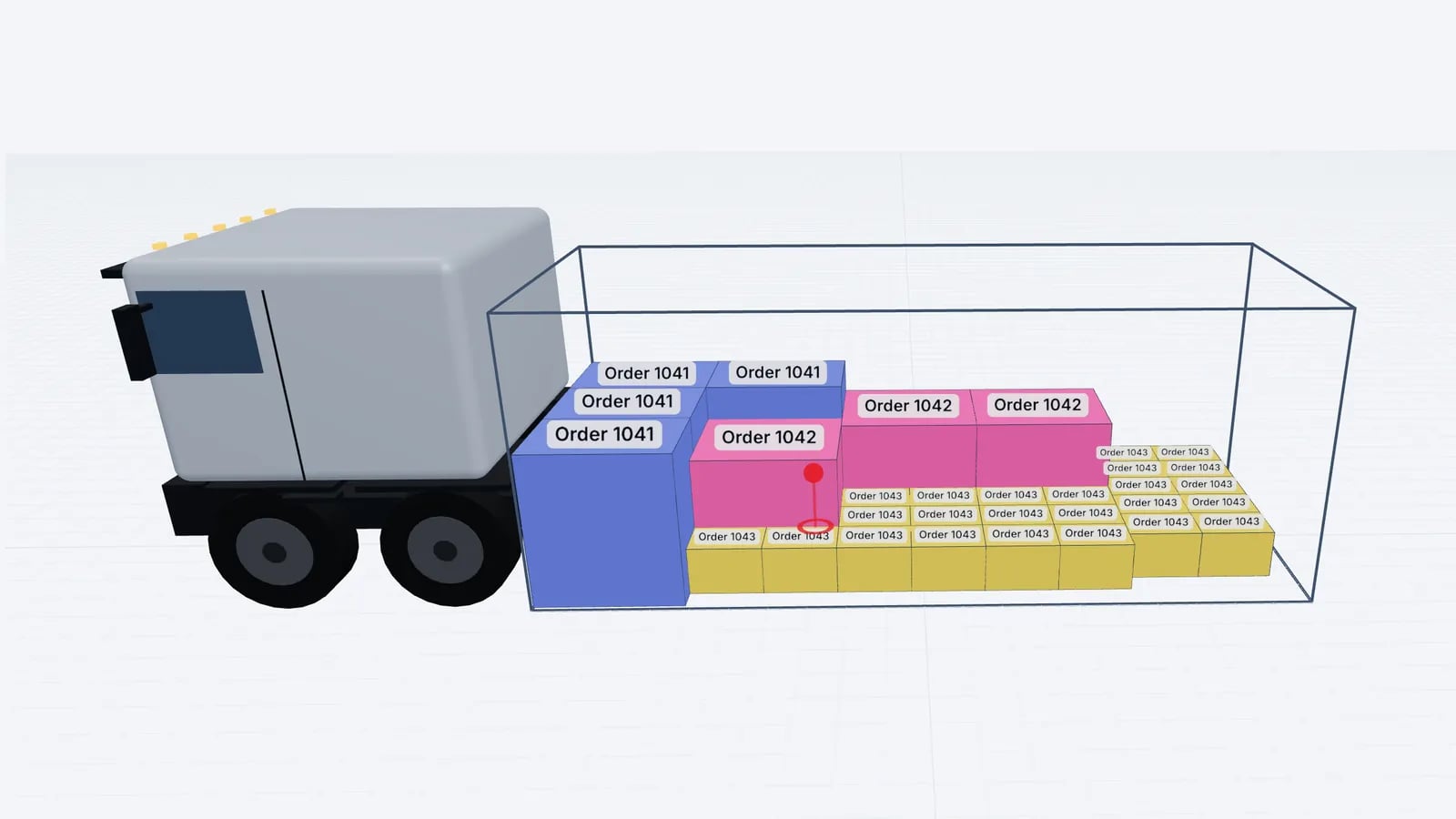
Excel is fine for load planning when every item is the same pallet, loaded one layer high, and the only question is "how many fit and how heavy is it?". Once you mix pallet sizes, stack, load cartons, care about axle loads or deliver to several stops, a spreadsheet can no longer tell you whether the load physically works. The practical answer for most teams is to keep Excel for the packing list and use a 3D planner for the arrangement.
What a spreadsheet does well
Spreadsheets are where most cargo data already lives. Order lines come out of the ERP into Excel, someone adds pallet counts and weights, and a few formulas give the totals. For simple, repeatable loads this is quick and transparent.
- Totals. Sum of weight, sum of volume (L × W × H × quantity), number of pallets.
- Loading metres for uniform pallets. For pallets loaded side by side across a 2.4 m width, LDM = length × width ÷ 2.4 per pallet, so a Euro pallet is 1.2 × 0.8 ÷ 2.4 = 0.4 LDM. See loading metres explained.
- Simple capacity checks. 33 Euro pallets single-stacked in a standard 13.6 m trailer, 26 industrial pallets, and so on.
- History. Every load is a row you can filter and report on.
Where Excel planning breaks down
The limit is geometry. A cell can hold a number, but it cannot tell you whether a 120 × 100 pallet fits beside two Euro pallets in the last row, or whether the carton stack in the nose will touch the roof. Volume totals are especially misleading: a load can be at 60 % of the trailer’s cubic capacity and still not fit, because items cannot be stacked or the footprints do not tile.
Question: Total weight vs payload
- Excel
- Yes
- 3D planner
- Yes
Question: Does it fit, uniform pallets single-stacked
- Excel
- Yes, with LDM
- 3D planner
- Yes
Question: Does it fit, mixed pallet sizes
- Excel
- Rough guess
- 3D planner
- Yes, arranged item by item
Question: Stacking with weight-on-top and non-stack rules
- Excel
- No
- 3D planner
- Yes
Question: Cartons of many sizes
- Excel
- No
- 3D planner
- Yes
Question: Axle load and centre of gravity
- Excel
- Only with a hand-built model
- 3D planner
- Estimate from item positions
Question: Loading order and multi-stop lanes
- Excel
- A typed list
- 3D planner
- Generated from the arrangement
Question: Drawings for the driver
- Excel
- No
- 3D planner
- Top, side and rear views
| Question | Excel | 3D planner |
|---|---|---|
| Total weight vs payload | Yes | Yes |
| Does it fit, uniform pallets single-stacked | Yes, with LDM | Yes |
| Does it fit, mixed pallet sizes | Rough guess | Yes, arranged item by item |
| Stacking with weight-on-top and non-stack rules | No | Yes |
| Cartons of many sizes | No | Yes |
| Axle load and centre of gravity | Only with a hand-built model | Estimate from item positions |
| Loading order and multi-stop lanes | A typed list | Generated from the arrangement |
| Drawings for the driver | No | Top, side and rear views |
A worked example: same volume, different answer
Say you have 30 industrial pallets (120 × 100 × 110 cm) for a standard trailer (about 13.6 × 2.45 × 2.7 m inside). The spreadsheet says total volume is 30 × 1.2 × 1.0 × 1.1 = 39.6 m³ against roughly 90 m³ of trailer, so 44 % full. Loading metres: 30 × 1.2 × 1.0 ÷ 2.4 = 15 LDM, more than the 13.6 m available. So far Excel has done its job: the load does not fit single-stacked.
Now the real question: can some pallets be double-stacked? Two pallets of 110 cm stack to 220 cm, under the 270 cm inside height, so physically yes, if the goods allow it. In a standard trailer, industrial pallets go two across with the 120 cm side across the width, 1.0 m of length per row, so 13 rows and 26 floor positions. You need 4 pallets on top. Which four? Light ones on heavier ones, spread along the length so the axle load stays even, and not on any pallet marked fragile. That is three constraints at once, and a spreadsheet has no way of checking them together. A 3D planner places the four, shows where they sit and estimates the effect on the axles.
Tip
If your spreadsheet already calculates LDM, keep that column: it is a fast first filter. Only move the load into a 3D planner when LDM is above about 85 % of the trailer or when anything has to be stacked.
Hidden costs of spreadsheet planning
- Knowledge in one head. The planner who "just knows" how a mixed load goes in is a single point of failure on holiday weeks.
- Re-work at the dock. If the plan does not match reality, the loader improvises, and the improvisation is rarely documented.
- Formula drift. Copies of copies of a template collect broken references and hard-coded numbers.
- No picture for the driver. A list of pallet numbers does not show where each one stands or what must come off first.
Keep Excel as the input
You do not need to give up the spreadsheet. Most 3D planners accept pasted rows, so the workflow becomes: build or export the packing list in Excel as you do today, copy the rows, paste them into the planner, optimise, check and print. In EveryLoading, for example, you paste rows in the order Name, Length, Width, Height, Weight, Qty straight into the cargo table; a header row such as "Length (mm)" is recognised, and a warning appears if the numbers look like millimetres but the units say centimetres. The import guide shows the details.
- 1Make sure every row has one item type with its size and the weight of one piece, not the line total.
- 2Use one unit per column and say which in the header.
- 3Add a stop number column if the load is multi-drop.
- 4Copy the rows and paste them into the planner’s cargo list.
- 5Set stacking and rotation rules for the rows that need them, then optimise.
For a fuller checklist of what the list itself should contain, see from packing list to load plan.
Signs it is time to switch
- Loads regularly come back with "didn’t fit" notes, or a second truck is ordered at the last minute.
- You stack or mix pallet sizes on more than the occasional load.
- Drivers ask where things go, or unload pallets to reach the next drop.
- You have had an axle overload at a weighbridge although the gross weight was legal.
- New planners take weeks to learn the unwritten rules.
Good to know
Whichever tool you use, the plan is only as good as the data. Wrong dimensions or a weight per line instead of per piece will give a wrong plan in Excel and in 3D alike.
Frequently asked questions
Is there a good Excel template for load planning?
A template can total weight, volume and loading metres for uniform pallets. It cannot check stacking, mixed footprints or the loading order, which is where most real loading problems come from.
Can I keep my Excel packing lists if I use a 3D planner?
Yes. Most planners accept pasted rows or CSV/XLSX files, so the spreadsheet stays your input and the planner handles the arrangement.
Why does my load not fit although the volume is only 60 %?
Volume ignores shape. Items that cannot be stacked, footprints that leave gaps across the width, and height left unused above low pallets all reduce what you can actually load.
Keep reading
Operations & software · · 4 min read
Goodloading Alternative: What to Compare Before Switching
Looking for a Goodloading alternative? What to compare when switching load planners: trial, file import, sequence, multi-stop, axles, vehicles and cost.
Read article
Operations & software · · 5 min read
Packing List for Load Planning: Fields, Formats and Clean-Up
What a packing list needs for load planning: size and weight per piece, quantity, stacking and stops. How to clean the data and paste it into a 3D planner.
Read article
Operations & software · · 6 min read
Load Planning Software: What to Look For Before You Buy
A buyer’s checklist for load planning software: 3D views, stacking and weight rules, Excel import, sequence, multi-stop, PDFs, price and vendor questions.
Read article