Loading Plan for Drivers: What the Paper and the Link Need
What drivers and the warehouse need in a loading plan: manifest, loading sequence, top/side/rear drawings, stop order and weights, on paper or a phone link.
Operations & software · · 5 min read
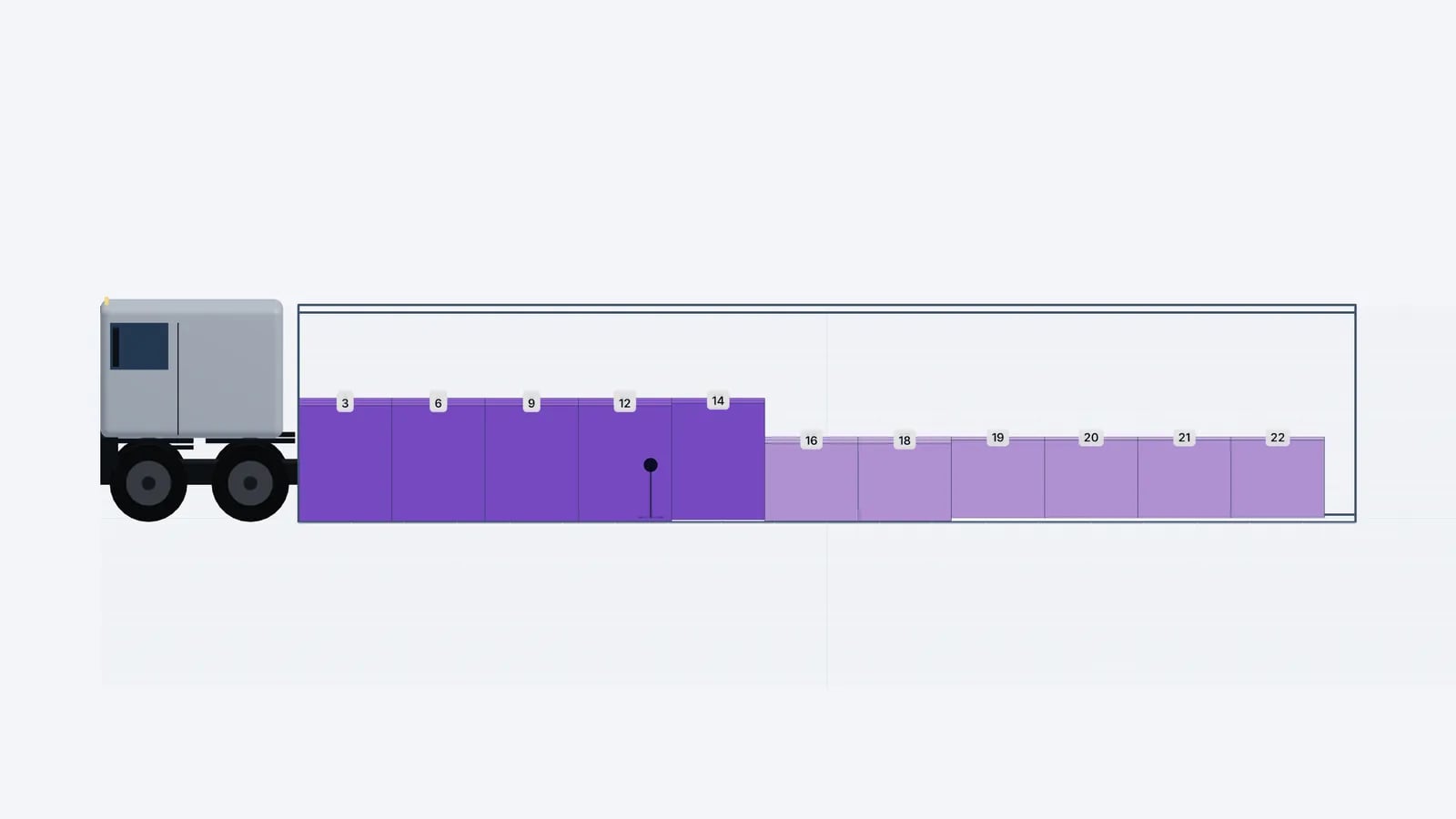
A loading plan for drivers should fit on a few pages and answer four questions without a phone call: what goes in this vehicle, in what order, where each item stands, and what comes off at each stop. That means a short summary, the manifest, a numbered loading sequence and simple top, side and rear drawings. Everything else belongs in the office system.
Who reads the plan, and when
The same plan is read by different people with different questions. Designing it around them is what makes it useful rather than just complete.
Reader: Warehouse picker
- When
- Before the truck arrives
- What they need
- Which items to stage, in which order
Reader: Forklift driver / loader
- When
- At the dock
- What they need
- Step-by-step order and where each item goes
Reader: Shift lead
- When
- At sign-off
- What they need
- Was everything loaded, are there deviations
Reader: Truck driver
- When
- Before departure and at each stop
- What they need
- Total weight, stop order, what to unload, securing
Reader: Customer at the drop
- When
- On arrival
- What they need
- Which items are theirs
| Reader | When | What they need |
|---|---|---|
| Warehouse picker | Before the truck arrives | Which items to stage, in which order |
| Forklift driver / loader | At the dock | Step-by-step order and where each item goes |
| Shift lead | At sign-off | Was everything loaded, are there deviations |
| Truck driver | Before departure and at each stop | Total weight, stop order, what to unload, securing |
| Customer at the drop | On arrival | Which items are theirs |
What the plan should contain
- Header. Plan name or reference, date, vehicle or container type, inside dimensions, registration or container number if known.
- Load summary. Total weight against payload, volume used, loading metres, number of pieces. If you estimate axle loads, give them here with a note that they are estimates.
- Manifest. One line per item type: name, size, weight per piece, quantity, stop.
- Loading sequence. Numbered steps, from the front wall towards the doors and from the floor up.
- Drawings. Top, side and rear (or front) views with step numbers or stop colours on the items.
- Exceptions. Anything that did not fit, and any special handling or securing notes.
Keep the manifest and the drawings consistent: if the drawing labels say "12" the sequence list must have a step 12 with the same item. Mismatches are where loaders start improvising.
Why drawings beat lists
A list tells the loader what to load; the drawing tells them where. The top view is the most important for pallet loads, because it shows the lanes and the gaps. The side view shows stacks and heights, which matters for double-stacked pallets and carton walls. The rear view is what the loader sees from the dock, so it is the easiest one to compare with reality before the doors close.
Tip
Number the items in the drawings by loading step, not by article number. Loaders work in sequence; article numbers send them hunting through the manifest.
A worked example: two-stop curtainsider
Say a 13.6 m curtainsider carries 18 Euro pallets for stop 1 and 12 for stop 2. Each pallet takes 0.4 loading metres, so stop 2 needs 12 × 0.4 = 4.8 m and stop 1 needs 18 × 0.4 = 7.2 m, 12.0 m in total, leaving 1.6 m free at the doors. If each pallet weighs 600 kg, the load is 30 × 600 = 18,000 kg.
The plan should make the stop split unmistakable: stop 2 pallets coloured one way in the first 4.8 m from the front wall, stop 1 another way in the rear 7.2 m. Steps 1–12 are stop 2, steps 13–30 stop 1. At stop 1 the driver can see that the first 18 pallets from the doors come off, and at stop 2 the remaining 12. A note should say the 1.6 m gap at the rear needs blocking or strapping, because pallets that can slide in that gap are a securing problem. See load securing basics.
Paper, PDF or a link?
Paper still works at the dock, where gloves, noise and no signal are normal. A PDF is the easiest way to produce that paper and to attach the plan to a transport order. A read-only link is better when the plan may change: the loader and the driver always see the latest version, can rotate the 3D view on a phone, and nobody works from yesterday’s printout.
- Use paper or PDF when the load is final, when the plan is part of the shipping documents, or when signal at the site is poor.
- Use a link when the plan may still change before loading, or when a subcontracted driver needs to see it without an account.
- Use both for important loads: print the PDF for the dock and send the link to the driver.
In EveryLoading, the PDF button produces a document with the vehicle and load summary, the manifest, the step-by-step sequence, top/side/front diagrams and any items not loaded; plans across several trucks get a set of pages per vehicle. Share creates a read-only link that opens without an account and can be switched off at any time. See PDF load plans and share links.
Practical tips for the dock
- 1Send the plan to the warehouse when the order is released, not when the truck is at the gate, so items can be staged in sequence.
- 2Print the top view large enough to read at arm’s length; a single A4 page per vehicle is usually right.
- 3Mark deviations on the printout in a different colour and send them back to planning.
- 4Photograph the finished load at the doors and attach the photo to the plan.
- 5Disable old share links when a plan is replaced, so nobody loads from a superseded version.
Good to know
The loading plan supports, but does not replace, the transport documents (CMR, delivery notes, dangerous goods paperwork) or your load securing obligations.
For the full process that produces this document, see how to make a load plan; for staging the goods before loading, see loading dock efficiency.
Frequently asked questions
Does the driver need software to read the loading plan?
No. A PDF prints like any document, and a read-only share link opens in a phone browser without an account.
Which view is most useful for loaders?
The top view for pallet lanes and gaps, the side view for stack heights, and the rear view for checking the load from the dock before the doors close.
Should the plan show axle loads?
It helps if you estimate them, clearly marked as estimates from the cargo only. The driver still needs to respect the vehicle’s real limits, checked on a weighbridge when close.
What if the load is changed at the dock?
Update the plan and reissue it, or at least mark the change on the printout and report it, so the driver and the next stop know what is actually on board.
Keep reading
Operations & software · · 6 min read
Load Planning Software: What to Look For Before You Buy
A buyer’s checklist for load planning software: 3D views, stacking and weight rules, Excel import, sequence, multi-stop, PDFs, price and vendor questions.
Read article
Operations & software · · 5 min read
Load Planning in Excel vs a 3D Planner: When to Switch
Where load planning in Excel works, where it breaks (stacking, mixed sizes, axles, sequence) and how to keep your spreadsheet as input for a 3D planner.
Read article
Operations & software · · 4 min read
Goodloading Alternative: What to Compare Before Switching
Looking for a Goodloading alternative? What to compare when switching load planners: trial, file import, sequence, multi-stop, axles, vehicles and cost.
Read article