Truck Loading Diagram: What to Show and How to Read One
A truck loading diagram shows where every item goes. What it must include, how to read top, side and rear views, and how to make a trailer loading diagram.
Road freight · · 7 min read
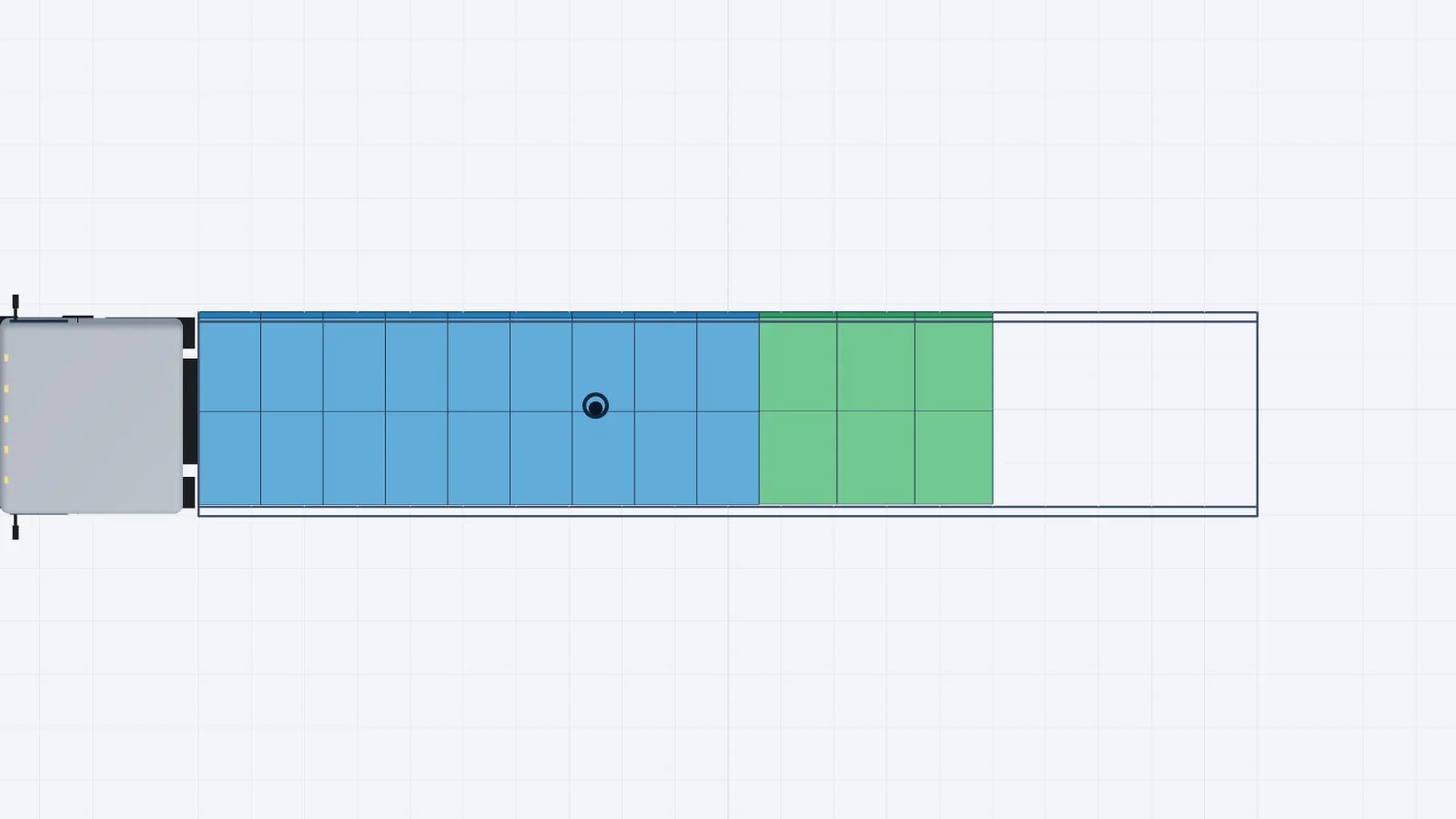
A truck loading diagram is a drawing that shows where each item goes in a truck or trailer, usually from the top, side and rear, with the loading order and weights. A good diagram lets someone who was not part of the planning load the vehicle correctly without asking.
It is the visual part of a load plan. The cargo list says what is going, and the diagram says where. Below is what a trailer loading diagram must show, how to read one and how to make your own.
What a truck loading diagram must show
- The vehicle. Type, inside length, width, height and which end or side is loaded. Mark the front wall and the doors, so nobody reads it backwards.
- Every item. A box or shape at the right position and approximate scale, with a name or number that links it to the cargo list.
- Loading order. A step number on each item, so the crew knows which goes first.
- Weights. Weight per item or row, the total load and the payload left.
- Stacking. What stands on what, and anything that must not be stacked on.
- Delivery stops. Which items belong to which stop, usually by colour or stop number.
- Unloaded items. Anything that did not fit. It is better to show this than to leave it for the dock to find.
- Handling notes. Securing points, fragile goods and required gaps.
Leave out what nobody needs. A clear drawing with ten labels helps more than a dense one with forty.
The views: top, side and rear
A truck is three-dimensional, and a single view hides something. That is why a truck loading diagram usually has several.
View: Top
- What it shows best
- Floor layout, rows, gaps, loading metres used
- What it hides
- Anything under a stacked item, heights
- Who uses it most
- Planner, forklift driver
View: Side
- What it shows best
- Stacks, height, how the load runs from front wall to doors, weight along the length
- What it hides
- Items behind others across the width
- Who uses it most
- Planner, driver checking axles
View: Rear
- What it shows best
- Left-to-right balance, width, height under the roof, the last row
- What it hides
- Everything deeper in
- Who uses it most
- Loader at the door, driver
View: 3D
- What it shows best
- The whole load at a glance, stacks and awkward shapes
- What it hides
- Exact distances
- Who uses it most
- Anyone new to the load
View: Sequence steps
- What it shows best
- What goes in next, one item at a time
- What it hides
- The finished load
- Who uses it most
- Loader on the dock
| View | What it shows best | What it hides | Who uses it most |
|---|---|---|---|
| Top | Floor layout, rows, gaps, loading metres used | Anything under a stacked item, heights | Planner, forklift driver |
| Side | Stacks, height, how the load runs from front wall to doors, weight along the length | Items behind others across the width | Planner, driver checking axles |
| Rear | Left-to-right balance, width, height under the roof, the last row | Everything deeper in | Loader at the door, driver |
| 3D | The whole load at a glance, stacks and awkward shapes | Exact distances | Anyone new to the load |
| Sequence steps | What goes in next, one item at a time | The finished load | Loader on the dock |
For a simple full truck of the same pallets, a top view may be enough. For mixed goods, stacks or several stops, use all of them.
How to read a trailer loading diagram
- 1Find the front. Look for the label for the front wall or the doors. Drawings differ on which end is on the left, so do not assume.
- 2Read the header. Confirm the vehicle, its inside size and the total weight match what is at the dock.
- 3Check the cargo list. Count the pieces on the drawing against the list, and look for anything marked as not loaded.
- 4Follow the numbers. Item 1 is first in, normally against the front wall. Follow them towards the doors.
- 5Check the stacks. In the side view, confirm what stands on what, and whether it can carry the weight.
- 6Check the balance. Heavy rows should be spread along the floor and balanced left and right.
- 7Find your stop. On a multi-drop plan, find the colour or number of each drop and confirm that first-stop goods are at the doors.
Good to know
Treat the diagram as an instruction, not a suggestion. If something at the dock does not match it, such as a different pallet or an extra order, stop and get the plan changed. A small swap can move the weight enough to change the axle loads.
Example: a simple row diagram
A diagram does not need to be fancy to be clear. Here is a simple top view written as a table, for a 13.6 m trailer loaded from the back with Euro pallets in rows of three. Stop 1 comes off first, so it sits at the doors. All weights are example figures.
Row: 1 (front wall)
- Left
- Stop 3
- Centre
- Stop 3
- Right
- Stop 3
- Row weight
- 1,950 kg
Row: 2
- Left
- Stop 3
- Centre
- Stop 3
- Right
- Stop 3
- Row weight
- 1,950 kg
Row: 3
- Left
- Stop 2
- Centre
- Stop 2
- Right
- Stop 2
- Row weight
- 1,800 kg
Row: 4
- Left
- Stop 2
- Centre
- Stop 2
- Right
- Stop 2
- Row weight
- 1,800 kg
Row: 5
- Left
- Stop 1
- Centre
- Stop 1
- Right
- Stop 1
- Row weight
- 1,500 kg
Row: 6 (doors)
- Left
- Stop 1
- Centre
- Stop 1
- Right
- Stop 1
- Row weight
- 1,500 kg
| Row | Left | Centre | Right | Row weight |
|---|---|---|---|---|
| 1 (front wall) | Stop 3 | Stop 3 | Stop 3 | 1,950 kg |
| 2 | Stop 3 | Stop 3 | Stop 3 | 1,950 kg |
| 3 | Stop 2 | Stop 2 | Stop 2 | 1,800 kg |
| 4 | Stop 2 | Stop 2 | Stop 2 | 1,800 kg |
| 5 | Stop 1 | Stop 1 | Stop 1 | 1,500 kg |
| 6 (doors) | Stop 1 | Stop 1 | Stop 1 | 1,500 kg |
From this table you can read a lot. There are 18 pallets, using 7.2 m of floor (6 × 1.2 m), or 7.2 loading metres. The load weighs 10,500 kg. Every row is full from side to side, so left and right balance if the pallets in a row weigh about the same, and the stop order is safe because nothing for a later stop stands between an earlier stop and the doors.
You can also see a problem. All six rows sit against the front wall, so the rear 6.4 m of the floor is empty and much of the weight is at the front. A planner should move the block back or spread the rows, then check the result. Weight distribution in a trailer explains the calculation.
How to make a truck loading diagram
You can draw one on squared paper, in a spreadsheet or in a load planner. The steps are the same.
- 1Collect the data. Size, weight, quantity and stacking rules per item. See packing list to load plan.
- 2Fix the vehicle. Use the inside dimensions and the door size of the real vehicle.
- 3Check capacity. Use the loading metre calculator to see whether the floor is enough before you draw.
- 4Place the last stop first. Start at the front wall with the goods that come off last.
- 5Place heavy and large items. Keep them low and spread along the floor, then fit lighter items around them.
- 6Add stacks. Only where the lower item can carry the weight.
- 7Check the weight. Compare the total with the payload and estimate the axle loads.
- 8Number the items. Give each one a step number in loading order.
- 9Draw the views. Top first, then side, then rear, with the front wall and the doors labelled.
- 10Hand it over. Print it or send a link, and keep it with the shipment papers. See loading plan for drivers.
Tip
If you need a layout to start from, the load plan template lists the fields to include around the drawing.
Hand-drawn, spreadsheet or software?
Method: Paper sketch
- Works for
- A few identical pallets, one stop
- Weak spot
- Hard to change, no weight check
Method: Spreadsheet grid
- Works for
- Regular rows, repeat loads
- Weak spot
- Flat, so it cannot show stacks well, and any change means redrawing
Method: Load planning software
- Works for
- Mixed goods, stacks, several stops
- Weak spot
- Needs accurate cargo data
| Method | Works for | Weak spot |
|---|---|---|
| Paper sketch | A few identical pallets, one stop | Hard to change, no weight check |
| Spreadsheet grid | Regular rows, repeat loads | Flat, so it cannot show stacks well, and any change means redrawing |
| Load planning software | Mixed goods, stacks, several stops | Needs accurate cargo data |
Excel vs a 3D load planner compares these in more detail. If you plan often, truck loading software produces the views and the sequence from one plan, so they cannot disagree with each other.
Common mistakes
- No label for the front, so the drawing is read the wrong way round.
- A top view only, which hides a heavy stack or an unsafe pair.
- Item codes that do not match the cargo list or the pallet labels.
- Weights missing, so nobody can check the axles.
- A diagram made for a different trailer from the one at the dock.
- An old version in the driver's hands after a late order change.
The same rules work for other loading spaces. A plan for a container follows the same logic, with door side and weight balance still central, as the sea freight use case shows. For trucks and trailers, see road transport planning.
Tip
EveryLoading builds this plan in 3D. Paste your list from Excel, optimize, and switch between the 3D, top, side and rear views. Play the loading sequence, check the axle load estimate, and export the plan as a PDF or a share link.
Frequently asked questions
What is a truck loading diagram?
A drawing that shows where each item goes in a truck or trailer, usually from the top, side and rear, with the loading order and weights.
What should a trailer loading diagram include?
The vehicle and its inside size, every item linked to the cargo list, the loading order, weights, stacks, delivery stops and any item that did not fit.
How do you read a truck loading diagram?
Find the front wall and doors, check the vehicle and pieces against the list, then follow the step numbers from the front wall towards the doors.
Why does a loading diagram need several views?
Each view hides something. The top view hides heights, the side view hides what is across the width, and the rear view hides everything deeper in.
Can I make a truck loading diagram in Excel?
Yes, for regular rows of the same pallets. It gets hard with stacks, mixed sizes or several stops, because changes mean redrawing and it cannot check weight or fit.
Keep reading
Road freight · · 8 min read
Semi Truck and Trailer Dimensions: US Length, Width, Height
Semi truck dimensions in the US: overall length, width and height, 53 ft and 48 ft dry vans, reefers and flatbeds, in feet and metric, with pallet counts.
Read article
Road freight · · 7 min read
How to Load a Truck: Axles, Heavy Low, Securing and Safety
How to load a truck step by step: plan first, keep heavy items low and spread over the axles, load towards the doors, secure the load and check the weight.
Read article
Road freight · · 5 min read
Multi Drop Loading: How to Plan a Truck for Several Stops
Plan a multi-drop truck so every stop unloads without moving other cargo: LIFO order, lanes, stop numbers, axle loads after each drop and a worked example.
Read article