Cargo Planner App: 12 Features It Must Have, With a Checklist
What a good cargo planner app must do: 12 features from cargo import to axle loads and share links, why each matters in daily planning, and a checklist to test.
Operations & software · · 7 min read
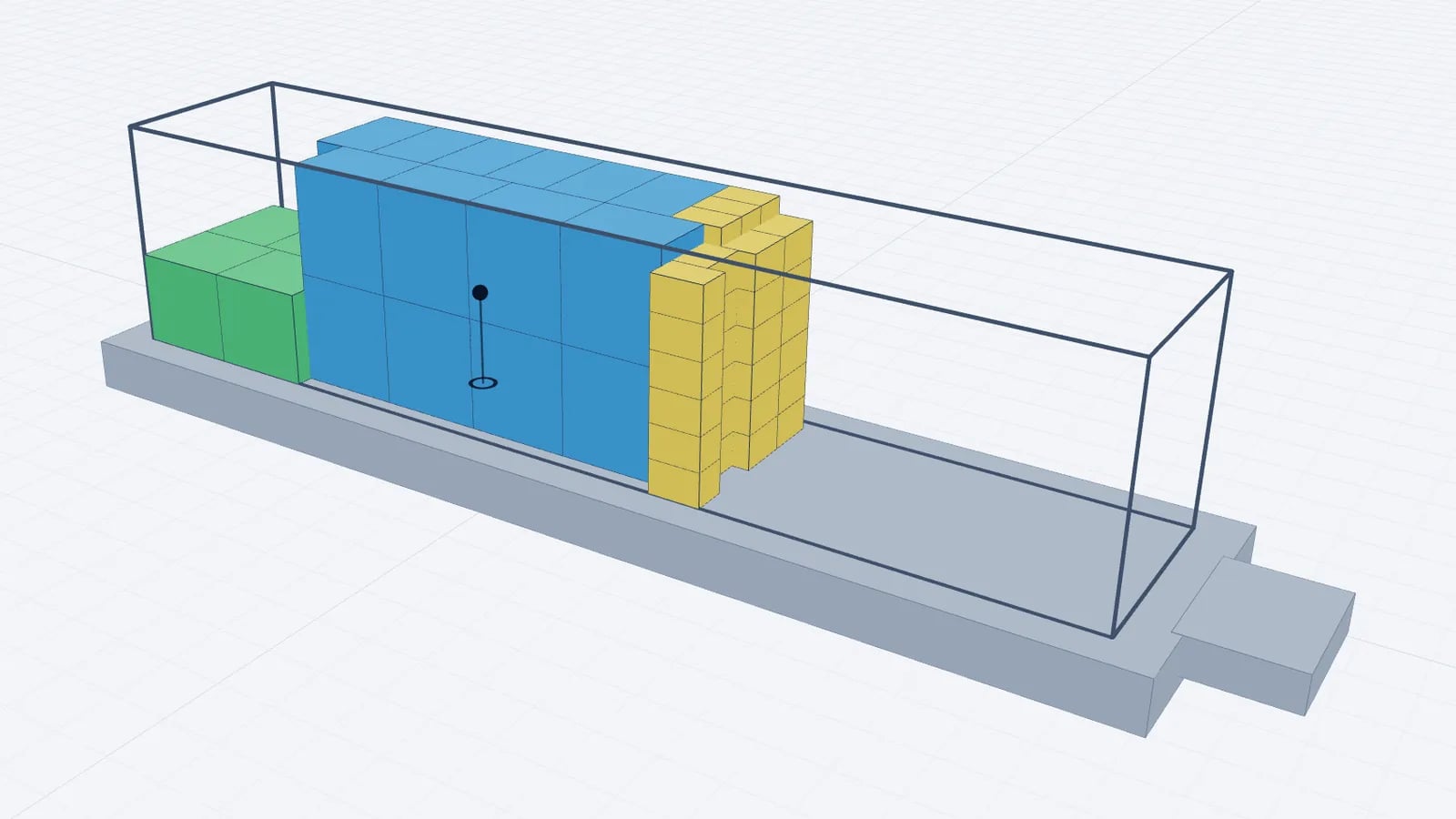
A good cargo planner does more than draw boxes in a box. It gets your cargo list in quickly, knows the real inside of your vehicles, respects the rules of each item, finds a dense arrangement, checks weight and axle loads, and hands the dock a plan in loading order. Below are the 12 features that decide whether a cargo planner app saves time every day or becomes one more screen to fill in, each with the reason it matters and a quick way to test it.
This is a feature list from the user's side. For buying questions such as contract terms, vendor questions and price, see our load planning software buyer's guide.
Good to know
We use "cargo planner" as a generic term. Cargo-Planner is also the name of a commercial product by Törnblom Software AB; it is a trademark of its owner, and EveryLoading is not affiliated with it. For a dated, sourced comparison see EveryLoading as a Cargo-Planner alternative.
Getting the load in
1. Fast cargo input. Most planning time is typing. A cargo planner should accept a packing list the way it arrives: rows pasted from Excel, a CSV or XLSX file, or data sent from your ERP. Columns should map by name, and units (mm, cm, m, inches; kg, lb) should be chosen once, not converted by hand.
Why it matters: a 60-line packing list typed by hand takes 20 minutes and contains mistakes; pasted, it takes one. Test: paste one of your real lists, unedited, and see how much needs fixing. From packing list to load plan covers what a clean list contains.
2. A vehicle library with real inside dimensions. Presets for vans, rigid trucks, semi-trailers, mega trailers, ISO containers, air ULDs and pallets, each with inside length, width, height and payload, and all editable. A planner that only knows nominal sizes plans loads that do not fit.
Test: change one preset to your measured trailer and save it as your own.
3. Rules per cargo item. Real cargo has rules: this side up, do not stack, maximum weight on top, maximum layers, floor only, may only stand on certain other items. The app must store them per item and the optimiser must obey them.
Why it matters: without stacking rules, every dense plan is a damage risk, and the planner has to fix each one by hand. Stacking rules for pallets explains which ones to record.
Building the plan
4. An optimiser that tries orientations and patterns. A good cargo planner tries each item in its allowed orientations, mixes lengthwise and crosswise rows, and reports clearly which items did not fit instead of silently dropping them. Speed matters too: seconds, not minutes, so you can compare two vehicles during a phone call.
Test: load 11 Euro pallets into a 20 ft container. They fit only with mixed orientations, so a planner that returns 7 or 8 is using one pattern.
5. Manual editing in 3D. No optimiser knows that the customer wants the spare parts at the doors. You need to drag, stack and rotate items yourself, with collision checks and snapping so a manual move cannot create an impossible plan.
6. Weight, axle load and centre of gravity. Gross weight against payload is the minimum. A useful cargo planner also estimates axle loads and the load's centre of gravity, and warns when a limit is passed, because a legal gross weight can still overload an axle. See truck axle weight limits in the EU for the rules behind it.
7. Delivery stops. For multi-drop routes, each line needs a stop number and the planner must load later stops deeper, so the first delivery is at the doors. Without this, the plan is right for the trip out and wrong at every stop.
Vehicles and fleet
8. Several vehicles in one plan. When the cargo does not fit one truck, the app should continue into a second and third, ideally with mixed vehicle types, and let you move items between them. Some apps also suggest the smallest vehicle or the best mix of vehicles for a given cargo list.
9. Vehicle details that change what fits. Wheel arches in vans and some trailers, a reefer's cooling unit at the front wall, a second deck (double-floor trailers), the door opening, and side loading. Each one changes the usable space. If your fleet has them, the app needs them.
Getting the plan to the dock
10. A loading sequence. The dock does not need a picture, it needs an order: which item goes in first, second and third. A step-by-step sequence the crew can follow, on screen or on paper, is the difference between a plan and a drawing.
11. Outputs people actually read. Top, side and rear views with dimensions, colour by stop or weight, a PDF that prints legibly, and a read-only link that always shows the current version. Drivers and customers should not need an account to view a plan.
12. Integration and saved work. Saved plans you can reopen and copy, undo and redo, and an API so your ERP or WMS can send orders and receive results. Even if you start manually, ask whether the data can flow automatically later.
Tip
Where the app runs matters as much as what it does: a browser app needs no installation and shares by link; a desktop program works without a connection. Online vs desktop cargo planners compares the two.
Cargo planner checklist
Use this table to test any cargo planner on one of your own loads. The right-hand column shows what EveryLoading offers, so you have a reference point.
Feature: 1. Cargo input
- Test it by
- Pasting a real packing list
- In EveryLoading
- Paste rows from Excel; CSV and XLSX import (Pro)
Feature: 2. Vehicle library
- Test it by
- Editing a preset to your measured size
- In EveryLoading
- Truck, trailer, container, ULD and pallet presets, plus your own sizes
Feature: 3. Cargo rules
- Test it by
- Setting no-stack and max weight on top
- In EveryLoading
- Stackable, max weight on top, max loads on top, floor only, may stand on, rotation
Feature: 4. Optimiser
- Test it by
- 11 Euro pallets in a 20 ft container
- In EveryLoading
- Tries lengthwise, crosswise and free orientations; lists what didn't fit
Feature: 5. 3D editing
- Test it by
- Moving an item into an occupied spot
- In EveryLoading
- Drag, stack and rotate with collision checks and snapping
Feature: 6. Weight and axles
- Test it by
- A part load pushed to the front wall
- In EveryLoading
- Centre-of-gravity estimate; axle loads (Pro); warnings above limits
Feature: 7. Delivery stops
- Test it by
- Three stops, checked from the doors
- In EveryLoading
- Stop number per row; later stops loaded deeper
Feature: 8. Several vehicles
- Test it by
- A load 20% too big for one truck
- In EveryLoading
- Multiple and mixed vehicles, vehicle suggestion (Pro)
Feature: 9. Vehicle details
- Test it by
- A van with wheel arches
- In EveryLoading
- Wheel arches, cooling unit, second deck, door size
Feature: 10. Loading sequence
- Test it by
- Following the plan step by step
- In EveryLoading
- Sequence slider and play button
Feature: 11. Outputs
- Test it by
- Opening the plan on a phone
- In EveryLoading
- Top, side and rear views; PDF and read-only share links
Feature: 12. Integration
- Test it by
- Sending a test order by API
- In EveryLoading
- Developer REST API (Pro)
| Feature | Test it by | In EveryLoading |
|---|---|---|
| 1. Cargo input | Pasting a real packing list | Paste rows from Excel; CSV and XLSX import (Pro) |
| 2. Vehicle library | Editing a preset to your measured size | Truck, trailer, container, ULD and pallet presets, plus your own sizes |
| 3. Cargo rules | Setting no-stack and max weight on top | Stackable, max weight on top, max loads on top, floor only, may stand on, rotation |
| 4. Optimiser | 11 Euro pallets in a 20 ft container | Tries lengthwise, crosswise and free orientations; lists what didn't fit |
| 5. 3D editing | Moving an item into an occupied spot | Drag, stack and rotate with collision checks and snapping |
| 6. Weight and axles | A part load pushed to the front wall | Centre-of-gravity estimate; axle loads (Pro); warnings above limits |
| 7. Delivery stops | Three stops, checked from the doors | Stop number per row; later stops loaded deeper |
| 8. Several vehicles | A load 20% too big for one truck | Multiple and mixed vehicles, vehicle suggestion (Pro) |
| 9. Vehicle details | A van with wheel arches | Wheel arches, cooling unit, second deck, door size |
| 10. Loading sequence | Following the plan step by step | Sequence slider and play button |
| 11. Outputs | Opening the plan on a phone | Top, side and rear views; PDF and read-only share links |
| 12. Integration | Sending a test order by API | Developer REST API (Pro) |
Score each line 0, 1 or 2 for your own operation, not in general. A container forwarder may not care about wheel arches; a parcel van operator may not need a second deck. The features you score 2 on, and the ones you would use every day, decide the choice.
Features that are nice but rarely decisive
- Photorealistic 3D. Clear colours and edges matter more than lighting effects.
- Huge preset catalogues. Fifty trailer variants help less than one that matches your own trailer.
- Automatic everything. An optimiser you cannot override is a problem the first time the customer asks for something specific.
What matters is how quickly a planner goes from a raw packing list to a plan the dock trusts. The person doing that work, and how the app supports them, is described in what a load planner does. To check your counts before you try any app, the pallet fit calculator gives a free reference number.
EveryLoading runs in the browser and you can start with a free account for loads up to 20 cargo pieces in trucks, vans and standard containers. PDF export and read-only share links are included. Pro, with a 3-day free trial, adds file import, several trucks in one plan, axle loads, every loading space and the API.
Frequently asked questions
What is a cargo planner?
Software that calculates how goods fit into a truck, container, ULD or pallet, shows the arrangement in 3D, and produces a loading plan. The term also describes the person who does this work.
Is there a free cargo planner app?
Several tools have free tiers or trials with limits on vehicles or piece counts. EveryLoading has a free account for small truck and standard container loads.
Which features matter most in a cargo planner?
Fast import of your packing list, correct vehicle sizes, stacking rules, a weight and axle check, and a loading sequence the dock can follow. The rest depends on your cargo and fleet.
Can a cargo planner handle mixed cargo?
A good one can: it tries each item in its allowed orientations, respects stacking rules per item, and reports which pieces did not fit instead of hiding them.
Keep reading
Operations & software · · 7 min read
Load Planning Software Integration with ERP, WMS and TMS
Load planning software integration explained: what data flows between ERP, WMS or TMS and the planner, file import vs REST API, and a step-by-step approach.
Read article
Operations & software · · 7 min read
Load Planning Software Implementation: A 30-Day Plan
A 30-day load planning software implementation plan: vehicle and cargo master data, pilot loads, training for planners and the dock, and how to measure results.
Read article
Operations & software · · 7 min read
Booking Cargo Space: Pallet Places, LDM, CBM and Weight
How to work out and book cargo space with a carrier or forwarder: pallet places, LDM, CBM, chargeable weight, and what the booking needs to avoid re-quotes.
Read article