Online Cargo Planner vs Desktop Software: Which Suits You?
Online cargo planner or installed desktop software? Compare setup, sharing, updates, data security, offline use and cost, and see who each suits.
Operations & software · · 7 min read
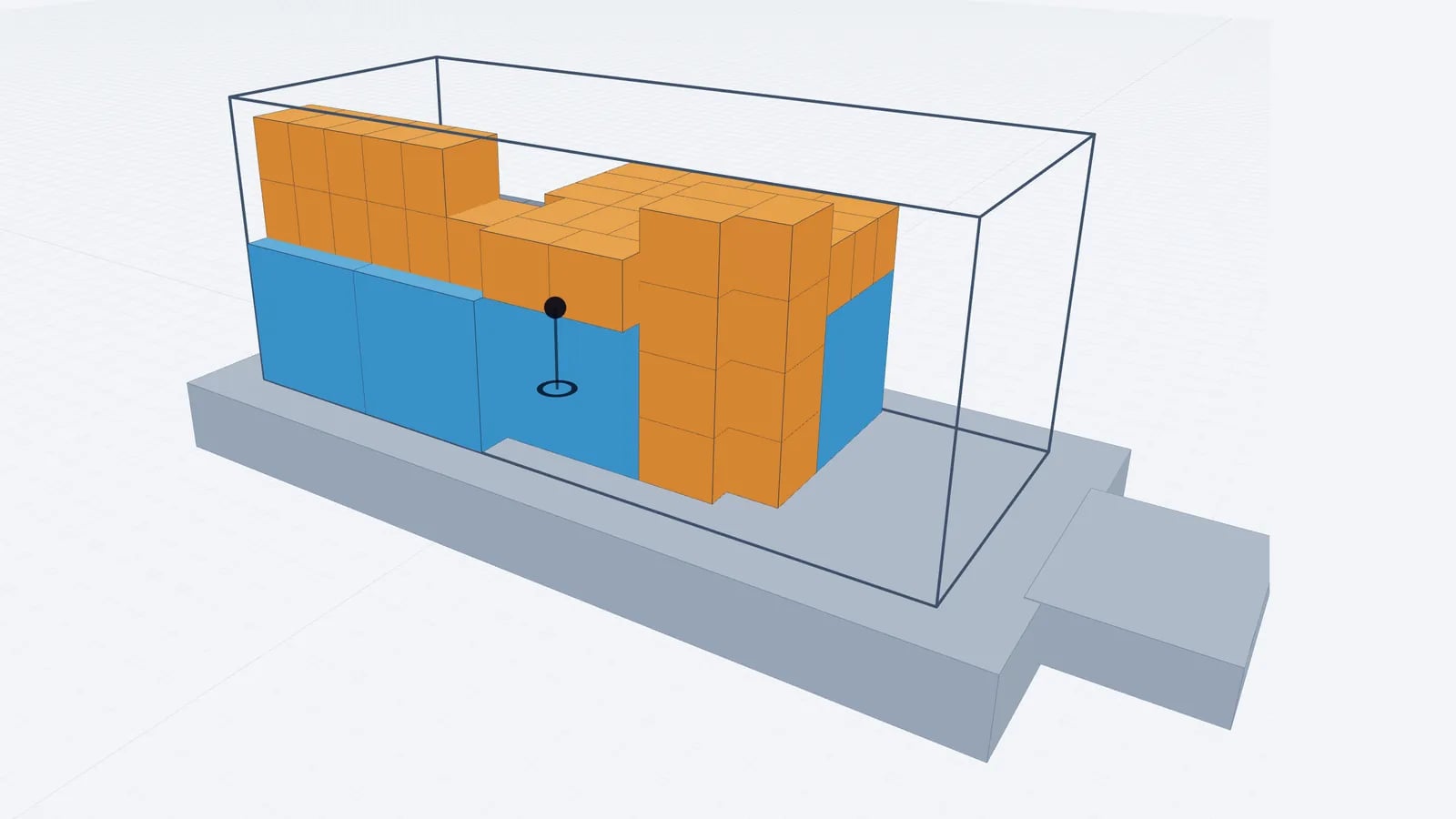
An online cargo planner runs in the web browser: nothing to install, plans saved on the vendor's servers, shared by link and updated without your IT team. A desktop load planner is a program installed on each PC: it works without a connection, keeps files on your own machines, and is often sold as a licence rather than a subscription. Which one suits you depends on how many people need the plans, where they work, and how your company handles software and data.
Both kinds can calculate a good load. This article compares everything around the calculation: setup, sharing, updates, security, offline use and cost. For the features the planning itself needs, see what a good cargo planner app must do.
Setup and getting started
Online: you create an account and start planning in the same minute. It works on Windows, Mac and Linux, on a laptop in the office or a tablet at the dock, as long as the browser is reasonably current. There is no installer for IT to approve, which in larger companies is often the slowest step.
Desktop: you download and install the program on each PC, usually with administrator rights, then activate a licence key. Many desktop planners are Windows-only, so Mac users need a virtual machine. The upside is that once installed, the program does not depend on anyone's server.
PackVol is an example of the desktop model: a Windows program installed from an .exe, sold as a one-time licence in LITE, STANDARD and DYNLOAD editions, with a fully functional trial of 14 to 45 days depending on the edition, according to its own pages.
Good to know
PackVol is a trademark of its owner; EveryLoading is not affiliated with it. Check the vendor's site for current terms. A dated comparison is on our load planner comparison page.
Sharing plans with the dock, drivers and customers
This is where the two differ most in daily work. A load plan is used by more people than the planner: the forklift driver, the truck driver, the customer's receiving team, sometimes the sales rep who promised the delivery.
- Online planners usually share by link. The recipient opens the plan in a browser, often without an account, and sees the current version. If the planner changes the plan at 15:00, the dock sees the change at 15:00.
- Desktop planners share by export: a PDF, an Excel file or a picture, sent by email. That works, but each export is a copy. If the plan changes, a new copy has to reach everyone, and the old one is still in someone's inbox.
Both should produce a PDF for drivers, because a paper plan in the cab works without signal and without a phone. The question is how easily the latest version reaches people who do not sit at the planner's desk.
Updates and new features
Online: the vendor updates the application for everyone at once. New vehicle presets, optimiser improvements and bug fixes arrive without anyone doing anything. The other side is that a change to the interface also arrives without warning, and you cannot stay on an older version you liked.
Desktop: you install updates when you choose, which suits companies with validated processes or strict change control. In practice, many installations stay several versions behind because nobody schedules the update, and a licence may only include updates for a set period unless you pay for maintenance.
Data security and control
Load plans contain commercial information: customers, order volumes, delivery addresses and routes. Where it lives matters.
Question: Where is the data?
- Online cargo planner
- On the vendor's servers; ask which country and provider
- Desktop planner
- On your PCs or file server
Question: Who backs it up?
- Online cargo planner
- The vendor; ask how often and how long backups are kept
- Desktop planner
- You; a lost laptop can mean lost plans
Question: Who can see it?
- Online cargo planner
- Account holders and anyone you send a share link to
- Desktop planner
- Anyone with access to the PC or the files
Question: How is it protected in transit?
- Online cargo planner
- HTTPS between browser and server
- Desktop planner
- Files sent by email or shared drives
Question: Contract and privacy
- Online cargo planner
- Ask for terms and, in the EU, a data processing agreement under GDPR
- Desktop planner
- Covered by your own IT policies
Question: Getting your data out
- Online cargo planner
- Ask about export formats and what happens if you cancel
- Desktop planner
- Files are already yours, in the program's format
| Question | Online cargo planner | Desktop planner |
|---|---|---|
| Where is the data? | On the vendor's servers; ask which country and provider | On your PCs or file server |
| Who backs it up? | The vendor; ask how often and how long backups are kept | You; a lost laptop can mean lost plans |
| Who can see it? | Account holders and anyone you send a share link to | Anyone with access to the PC or the files |
| How is it protected in transit? | HTTPS between browser and server | Files sent by email or shared drives |
| Contract and privacy | Ask for terms and, in the EU, a data processing agreement under GDPR | Covered by your own IT policies |
| Getting your data out | Ask about export formats and what happens if you cancel | Files are already yours, in the program's format |
Neither model is automatically safer. A well-run online service is often better protected than a shared office PC, and a desktop program on a managed, backed-up network keeps data entirely in-house. The questions in the table are the ones to ask, whichever you choose.
Offline use
A desktop planner works anywhere: on a ship, in a yard without signal, or during an internet outage. An online cargo planner needs a connection to open and save plans, and a share link needs one to view.
For most planners this matters less than it sounds. Planning happens at a desk with internet, and the people at the dock or in the cab can use the PDF. Where it does matter is field work: surveyors measuring cargo on remote sites, project cargo planners on vessels, or warehouses with unreliable connections. If that is you, test both in your real conditions.
Cost over three years
The two models charge differently, so compare them over the same period with all the extras included. Here is an illustration with made-up round numbers for one planner, not any vendor's price:
Cost item: Up-front
- Subscription (online)
- €0
- Licence (desktop)
- €2,000 licence
Cost item: Per year
- Subscription (online)
- €960 (€80 a month)
- Licence (desktop)
- €400 maintenance (20% of licence) for updates and support
Cost item: IT time to install and update
- Subscription (online)
- None
- Licence (desktop)
- Install on each PC, plus updates
Cost item: Extra user
- Subscription (online)
- Another subscription
- Licence (desktop)
- Another licence, or a multi-seat licence
Cost item: Three-year total, one user
- Subscription (online)
- €2,880
- Licence (desktop)
- €2,800 plus IT time
| Cost item | Subscription (online) | Licence (desktop) |
|---|---|---|
| Up-front | €0 | €2,000 licence |
| Per year | €960 (€80 a month) | €400 maintenance (20% of licence) for updates and support |
| IT time to install and update | None | Install on each PC, plus updates |
| Extra user | Another subscription | Another licence, or a multi-seat licence |
| Three-year total, one user | €2,880 | €2,800 plus IT time |
On these numbers, cost alone does not decide it. What usually decides is the number of users (subscriptions scale linearly, multi-seat licences may not), whether you would pay maintenance anyway, and how much the free option or trial lets you do before paying. Some online planners start free for small loads, which costs nothing to test. See free load planning software for what free tiers usually include, and free browser tools such as the CBM calculator answer quick volume questions without any account.
Online vs desktop at a glance
Setup
- Online cargo planner
- Account and browser, minutes
- Desktop load planner
- Install per PC, admin rights, licence key
Operating system
- Online cargo planner
- Any with a modern browser
- Desktop load planner
- Often Windows only
Sharing
- Online cargo planner
- Live links plus PDF
- Desktop load planner
- Exported files
Updates
- Online cargo planner
- Automatic for everyone
- Desktop load planner
- When you install them
Data location
- Online cargo planner
- Vendor's servers
- Desktop load planner
- Your own machines
Offline
- Online cargo planner
- Needs a connection
- Desktop load planner
- Works anywhere
Cost model
- Online cargo planner
- Monthly or yearly subscription
- Desktop load planner
- Licence, often with maintenance
Integration
- Online cargo planner
- Usually a web API
- Desktop load planner
- Often file or database links
| Online cargo planner | Desktop load planner | |
|---|---|---|
| Setup | Account and browser, minutes | Install per PC, admin rights, licence key |
| Operating system | Any with a modern browser | Often Windows only |
| Sharing | Live links plus PDF | Exported files |
| Updates | Automatic for everyone | When you install them |
| Data location | Vendor's servers | Your own machines |
| Offline | Needs a connection | Works anywhere |
| Cost model | Monthly or yearly subscription | Licence, often with maintenance |
| Integration | Usually a web API | Often file or database links |
Who each suits
An online cargo planner suits teams with planners in several places or working from home, companies that mix Mac and Windows, operations where drivers, docks and customers need to see plans, small firms without IT support, and anyone who wants to try before committing money. It also suits integration with modern systems, since most online planners offer a web API.
A desktop planner suits companies whose IT policy keeps data on premises, planners working where connections fail, organisations that prefer to own a licence and control updates, and teams already linking software to an internal database.
Many teams also start from spreadsheets rather than either. If that is where you are, Excel vs a 3D load planner covers when the switch pays off, and implementing load planning software covers the rollout once you have chosen.
Tip
EveryLoading is an online cargo planner: it runs in any modern browser with nothing to install, saves plans to your account, and shares them as a PDF or a read-only link, on free accounts too. The developer API lets other systems send cargo and receive plans. Start with a free account and plan one of your real loads before deciding.
Frequently asked questions
Is an online cargo planner safe for company data?
It can be, if the vendor hosts data securely, encrypts connections and offers clear terms. Ask where the servers are, how backups work and how you export your data if you leave.
Can I use an online load planner offline?
Generally not for planning or viewing live links. Export a PDF before you go somewhere without signal, or choose desktop software if offline work is routine.
Does a browser-based load planner work on a Mac?
Yes. Browser planners run on Mac, Windows and Linux. Many installed planners are Windows-only and need a virtual machine on a Mac.
Is desktop load planning software cheaper?
Not necessarily. A one-time licence looks cheaper per year, but maintenance fees, extra seats and IT time often bring the total close to a subscription over three years.
Keep reading
Operations & software · · 7 min read
Load Planning Software Integration with ERP, WMS and TMS
Load planning software integration explained: what data flows between ERP, WMS or TMS and the planner, file import vs REST API, and a step-by-step approach.
Read article
Operations & software · · 7 min read
Load Planning Software Implementation: A 30-Day Plan
A 30-day load planning software implementation plan: vehicle and cargo master data, pilot loads, training for planners and the dock, and how to measure results.
Read article
Operations & software · · 7 min read
Booking Cargo Space: Pallet Places, LDM, CBM and Weight
How to work out and book cargo space with a carrier or forwarder: pallet places, LDM, CBM, chargeable weight, and what the booking needs to avoid re-quotes.
Read article