Cargo Loading Software for Freight Forwarders
How freight forwarders use cargo loading software for quoting, consolidation, LCL and groupage, choosing containers and sharing load plans with shippers.
Operations & software · · 7 min read
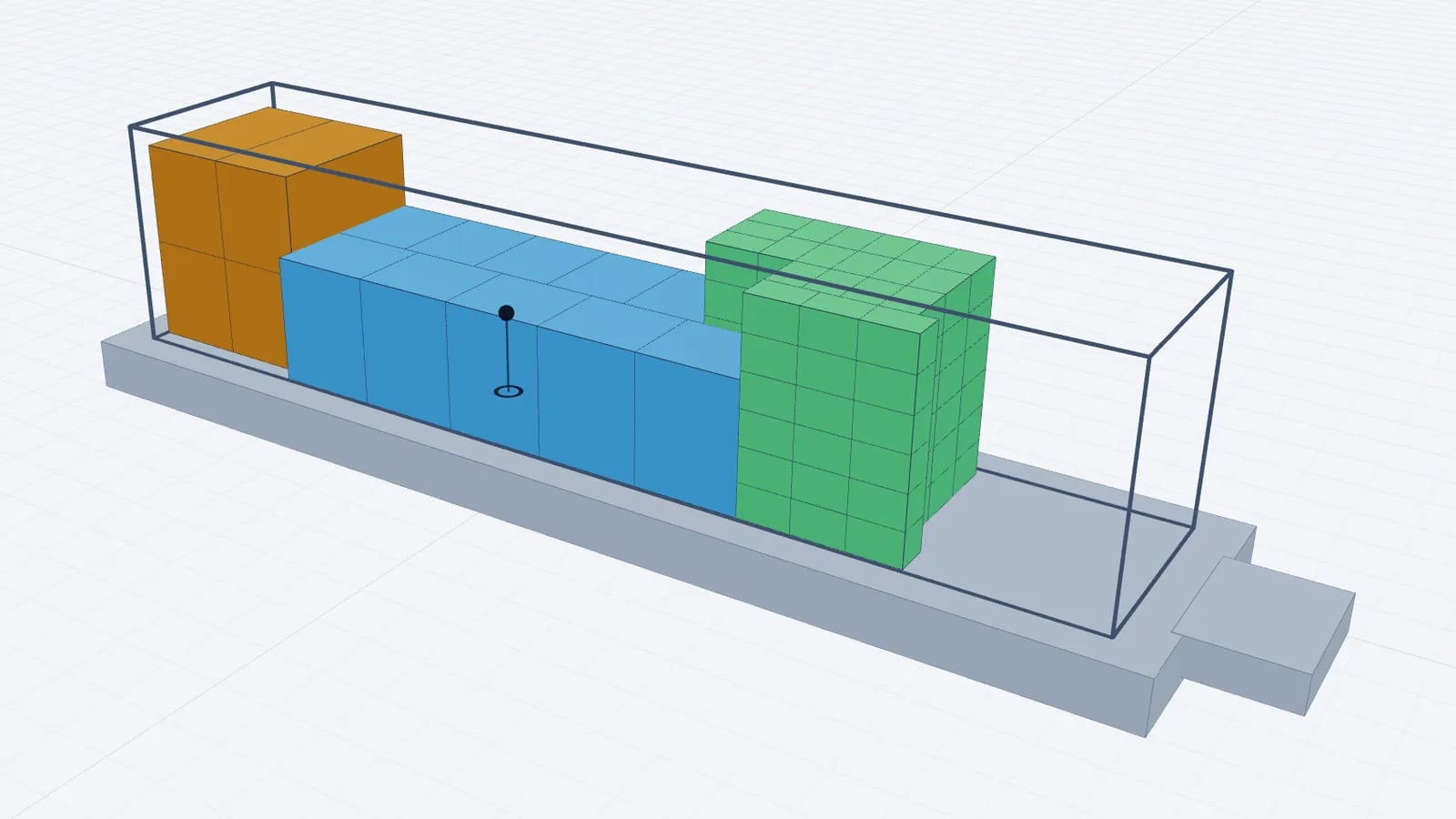
For a freight forwarder, cargo loading software is mainly a quoting and consolidation tool. It tells you, before you book, whether a shipment goes in a 20 ft, a 40 ft or a high cube, how several shippers’ cargo combines in one container or trailer, and it gives the shipper, the warehouse and the haulier the same plan to work from. The value is in faster, safer answers to "will it fit?" and in fewer containers booked for the same freight.
Manufacturers load the same products again and again; forwarders see a different mix on every booking, from many shippers, often with incomplete data. That changes what matters in a tool. This article covers the forwarder’s side; the shipper’s side is in cargo loading software for manufacturers.
Quoting: answer "will it fit?" with a plan, not a guess
A customer sends a packing list and asks for a price. The quick route is to add up the volume and divide by a rule of thumb, for example 25 to 28 m³ of usable space in a 20 ft container. That works for uniform cartons and fails for pallets, crates and long items, because a 20 ft container holds 33 m³ of air but only so many pallet footprints. Getting it wrong either way costs you: quote a 20 ft that turns out too small and you absorb the difference, quote a 40 ft for cargo that fits a 20 ft and you lose the job.
With a planner, the quoting desk pastes the packing list, picks the container and optimises. In a minute it shows what fits, what is left over, the total weight and the volume utilisation. If the list arrives without dimensions per piece, the plan also makes it obvious which data is missing before you commit to a price. For a first estimate without a plan, the container size calculator gives a starting point.
Container: 20 ft standard
- Typical inside L × W × H (cm)
- 590 × 235 × 239
- Volume
- 33.1 m³
- Typical payload
- 28,200 kg
Container: 40 ft standard
- Typical inside L × W × H (cm)
- 1,203 × 235 × 239
- Volume
- 67.6 m³
- Typical payload
- 26,680 kg
Container: 40 ft high cube
- Typical inside L × W × H (cm)
- 1,203 × 235 × 269
- Volume
- 76.0 m³
- Typical payload
- 26,460 kg
Container: 45 ft high cube
- Typical inside L × W × H (cm)
- 1,356 × 235 × 270
- Volume
- 86.0 m³
- Typical payload
- 27,700 kg
| Container | Typical inside L × W × H (cm) | Volume | Typical payload |
|---|---|---|---|
| 20 ft standard | 590 × 235 × 239 | 33.1 m³ | 28,200 kg |
| 40 ft standard | 1,203 × 235 × 239 | 67.6 m³ | 26,680 kg |
| 40 ft high cube | 1,203 × 235 × 269 | 76.0 m³ | 26,460 kg |
| 45 ft high cube | 1,356 × 235 × 270 | 86.0 m³ | 27,700 kg |
These are typical values; inside dimensions and payloads vary by container builder and owner, so use the figures for the equipment the line will actually supply when they are known.
Container choice: a worked consolidation
Three shippers want to go in one container to the same port. Shipper A has 10 industrial pallets (120 × 100 × 150 cm, 600 kg, not stackable). Shipper B has 120 cartons (60 × 40 × 40 cm, 20 kg). Shipper C has 4 crates (200 × 110 × 120 cm, 900 kg, cartons may go on top).
- Volume: A 18.0 m³ + B 11.5 m³ + C 10.6 m³ = 40.1 m³. Too much for a 20 ft (33.1 m³) on volume alone.
- Weight: 6,000 + 2,400 + 3,600 = 12,000 kg. Well within any container payload.
- Floor in a 40 ft: the pallets go two across (200 of 235 cm) in five rows, 600 cm. The crates go two across (220 cm) in two rows, 400 cm. That leaves about 200 cm of floor at the door.
- Cartons: on top of the crates there is 119 cm of height, enough for two layers of 40 cm cartons over 400 × 220 cm; the rest go in the free space at the door.
Result: one 40 ft standard is enough; a high cube is not needed. The plan also shows how much of the door end is still free, which is space you can sell to a fourth shipper. A spreadsheet tells you 40.1 m³ goes in 67.6 m³; the plan tells you which 40 ft arrangement works with non-stackable pallets and where the next booking can go.
Tip
When consolidating, give each shipper’s cargo its own colour and a name prefix (A-, B-, C-) in the cargo list. The 3D view and the item list then show at a glance whose goods are where, which helps at destination devanning.
LCL and groupage: who pays for which space
In LCL sea freight, charges are commonly based on weight or measure (W/M): the greater of the volume in m³ and the weight in tonnes. Shipper B in the example is 11.5 m³ and 2.4 t, so it is charged on 11.5 revenue tons. Shipper A is 18.0 m³ and 6.0 t, so 18.0. But a non-stackable pallet blocks the space above it too, so the space A really uses is the full container height over its footprint: 10 × 1.2 m² × 2.39 m = 28.7 m³. Many forwarders add a surcharge for non-stackable cargo for this reason, and a load plan makes the lost space visible when you discuss it with the shipper.
Road groupage works on loading metres or pallet places rather than m³. The same logic applies: a non-stackable pallet costs a full floor position. Our comparison of FCL vs LCL covers the break-even between a full container and shared space.
For groupage trucks with several delivery addresses, a stop number per cargo row lets the optimiser load later stops deeper in the trailer, so the first drop is at the doors. Stops are entered per row, so a mixed groupage list stays one plan.
What forwarders need from cargo loading software
| Need | Why it matters for a forwarder |
|---|---|
| Fast data entry from any packing list | Every booking has a new list, often in Excel, in different column orders |
| All the common spaces | Sea containers, road trailers and air ULDs in one tool |
| Stacking and rotation rules per item | Shippers’ goods have different limits; one wrong stack is a claim |
| Several vehicles in one plan | Large shipments that need two or more containers or trucks |
| Weight and centre of gravity | VGM must be declared, and a lopsided container is a handling risk |
| Share links and PDF | The shipper, the stuffing warehouse and the haulier work from one plan |
| API | Quoting or booking systems can check fit without re-keying |
EveryLoading covers these in the browser. Pasting rows from Excel works on every account; Pro adds CSV and XLSX import (including files from some other planners), plans across several identical vehicles, an axle-load and centre-of-gravity estimate, PDF load plans, read-only share links, vehicle suggestions across the presets, air ULDs such as LD3, and the developer REST API. The sea freight use case shows a container plan step by step.
Sharing the plan with shippers and warehouses
A forwarder’s plan is useless if it stays on the forwarder’s screen. The stuffing warehouse needs to know which pallets go in first and which items stand on which. The shipper may want to see that their fragile goods are not under a crate. The haulier wants the total weight. A read-only share link gives each of them the same 3D plan and loading sequence without an account, and a PDF goes with the container paperwork; see PDF and share links.
Sharing the plan does not replace the formal documents. Under SOLAS the shipper must provide the verified gross mass (VGM) before the container is loaded onto the ship, and the IMO/ILO/UNECE CTU Code sets out good practice for packing and securing cargo transport units. A clear plan makes both easier: the total weight is calculated from the items, and the arrangement shows where blocking and lashing are needed. Our article on container loading documentation lists the papers that travel with a container.
Good to know
The weight in a load plan comes from the weights you entered. It is a planning value, not a VGM. The VGM must be obtained by weighing the packed container or by the approved calculation method; see VGM under SOLAS.
Air cargo bookings
For air shipments the forwarder’s first question is chargeable weight, then whether the pieces build onto the ULD or pallet the airline offers. Work out chargeable weight first with the chargeable weight calculator, then plan the pieces into the ULD to see whether they fit its contour and payload.
Getting started
Pick five recent bookings: a full container, a consolidation, an LCL shipment with non-stackable cargo, a multi-drop groupage truck and one large shipment that needed two containers. Plan each in the tool and compare with what was booked. You can start with a free account for small loads in trucks and standard containers, and use the Pro trial for the larger ones.
Frequently asked questions
Why do freight forwarders use cargo loading software?
To quote the right container or truck quickly, to combine several shippers’ cargo safely in one unit, and to give the shipper, warehouse and haulier the same plan. It turns a volume estimate into an arrangement that respects stacking and weight.
How many cubic metres fit in a 20 ft container in practice?
The inside volume is about 33 m³, but mixed cargo usually uses 25 to 28 m³ of it. Pallets and crates often use less, because the limit is the number of footprints on the floor, not the air above them.
Can a load plan be shared with a shipper who has no account?
In EveryLoading, read-only share links (free accounts included) open the 3D plan and loading sequence in a browser without signing in, and a PDF can be attached to the booking.
Is the weight in a load plan the VGM?
No. It is the sum of the weights you entered, useful for planning. The VGM must come from weighing the packed container or from the approved calculation method in the SOLAS rules.
Keep reading
Operations & software · · 7 min read
Load Planning Software Integration with ERP, WMS and TMS
Load planning software integration explained: what data flows between ERP, WMS or TMS and the planner, file import vs REST API, and a step-by-step approach.
Read article
Operations & software · · 7 min read
Load Planning Software Implementation: A 30-Day Plan
A 30-day load planning software implementation plan: vehicle and cargo master data, pilot loads, training for planners and the dock, and how to measure results.
Read article
Operations & software · · 7 min read
Booking Cargo Space: Pallet Places, LDM, CBM and Weight
How to work out and book cargo space with a carrier or forwarder: pallet places, LDM, CBM, chargeable weight, and what the booking needs to avoid re-quotes.
Read article